歩く・止まる・反応する
透明な最前面レイヤーで歩き、走り、止まり、自然に左右を向きます。クリックすると小さな反応を返し、デスクトップへのクリックは通します。

デグーをクリック
Windowsのタスクバー上やMacのDock上を、ピクセル風のデグーが歩くデスクトップペットです。 キーボード入力やクリックに反応し、Windows版では採食、食べる、掘る、毛づくろい、自然な左右ターン、入力中やランダム散歩中の回し車にも対応しています。
Windows 10/11はZIPを展開して DeguDesktop.exe を起動してください。
Mac版はZIPを展開し、DeguDesktop.app をアプリケーションフォルダへ入れてください。
通常版はmacOS 12 Monterey以降に対応しています。M1 / M2 / M3 / M4などはApple Silicon版、Intel MacはIntel版を選んでください。 macOS 11 Big SurではBig Sur互換版を選びます。2015年頃のMacBookは多くの場合Intel版です。
Degu Desktopの動き
普段は静かに歩き、入力やクリック、近くの仲間や小さなアイテムに反応します。
透明な最前面レイヤーで歩き、走り、止まり、自然に左右を向きます。クリックすると小さな反応を返し、デスクトップへのクリックは通します。
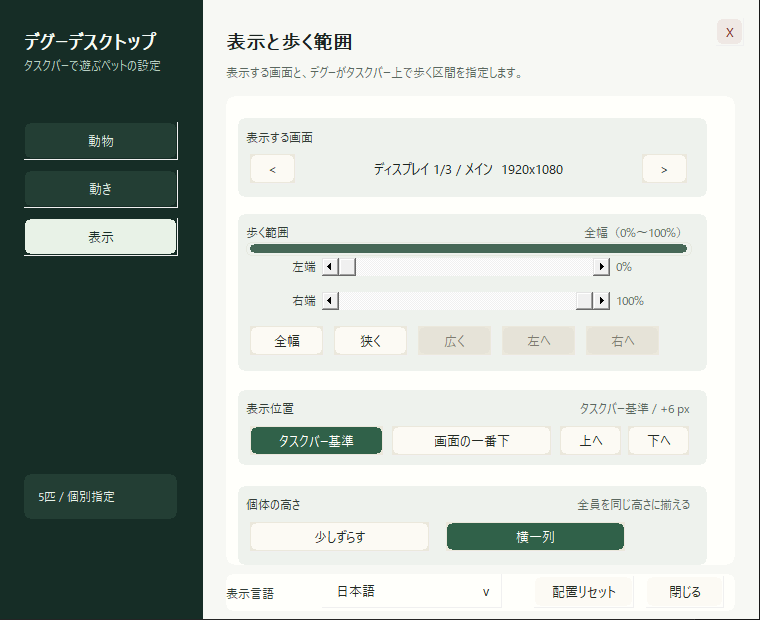
表示数、毛色、1匹ごとの名前、速度を設定できます。Windows版では75%〜150%の拡大率、1画面・複数モニターの表示範囲、歩く範囲、上下位置、高さ揃えも調整できます。
Windowsではタスクバー付近、MacではDock上の下端を歩きます。Windowsはトレイから一時非表示・再表示でき、Macはメニューバーから設定を開きます。
キーボード反応モードでは入力中に回し車へ入り、ランダム散歩モードでは自然な行動として時々走ります。
Windows版では牧草、枝、種を嗅ぐ、食べる、掘る、かじる、運ぶ動きがあります。近くのデグー同士で歩き、毛づくろいもします。
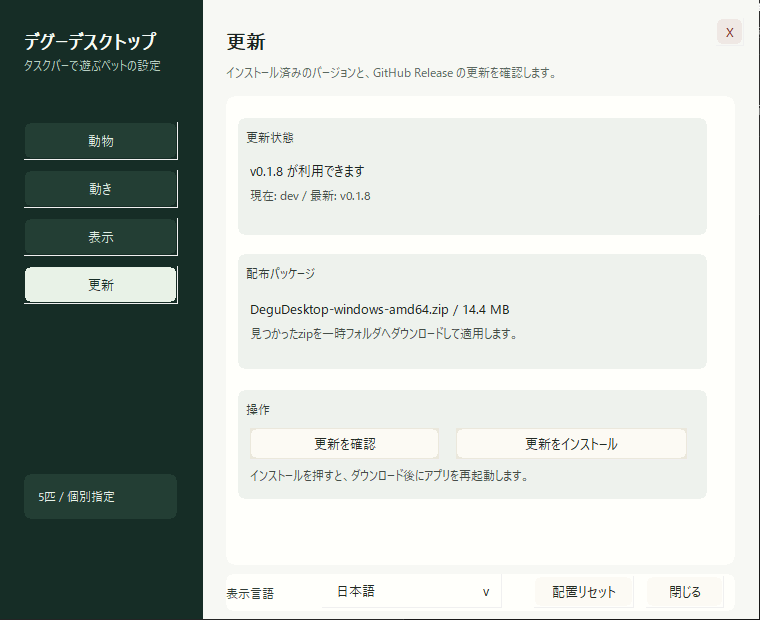
日本語・英語を切り替えられます。Windows版は更新ZIPのサイズとSHA-256 digestを確認し、制限付きヘルパーで実行ファイルだけを置き換えます。
DeguDesktop.exe を起動します。タスクバー付近にデグーが表示され、タスクトレイにアイコンが入ります。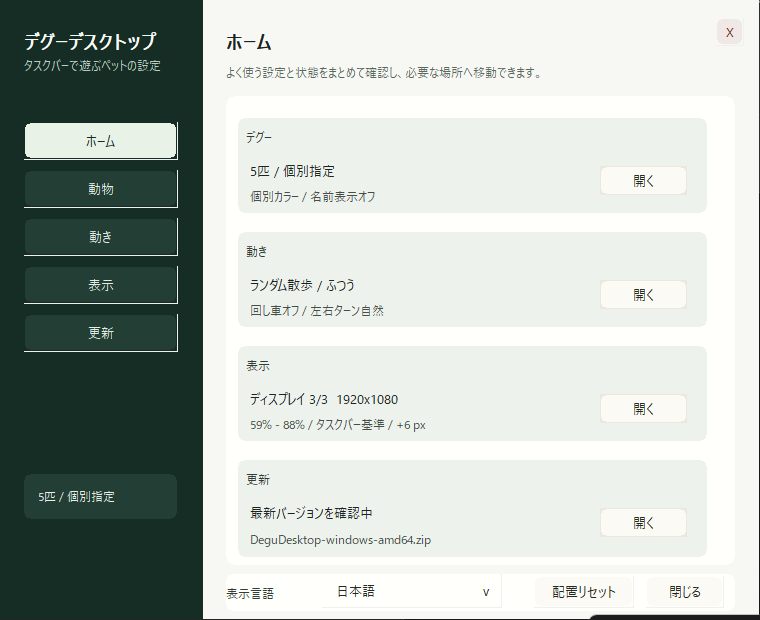
毛色バリエーション
固定、1匹ごと、ランダムから選べます。パイド系は不規則な白模様を持つ毛色です。

Wild agouti

Black

Blue gray

Gray

White cream

Sand champagne

Chocolate

Black pied

Agouti pied

Blue pied

Cream pied
リリース情報
Windows最新版はv0.1.14、Mac版はv0.1.9です。
更新ZIPのサイズとSHA-256 digestを確認し、制限付きヘルパーで置き換える安全な更新処理へ変更しました。言語切替と75%〜150%の拡大率も追加しました。
複数モニターの歩く範囲を画面単位で表示し、選択中の画面全体へ戻しやすくしました。
追加したデグーを選択中のモニターへ分配し、画面外やモニター間の隙間へ初期配置しないようにしました。
複数モニターの表示範囲、範囲の移動、トレイからの一時非表示・再表示を追加しました。
設定にHome、Display、Updatesを追加。表示先、歩く範囲、上下位置、個体の高さ揃えを設定できます。
ランダム散歩中に、デグーが時々回し車へ入る行動を追加しました。
1〜10匹のトレイ操作と、自然な高さ・同じ高さを選べる整列設定を追加しました。
回し車の中で走る専用モーションと、前後に分けたリム描画を追加しました。
Macメニューバー版と、macOS 11 Big Sur向けApple Silicon / Intel互換ZIPを追加しました。
macOS用CocoaブリッジをDarwinビルドへ限定し、他のOSのビルド境界を修正しました。
メニューバー設定とDock上の透明オーバーレイを持つMac版を追加しました。
動作セット、毛色、表示数、名前、入力モードなどの設定を拡張しました。
歩行、待機、入力反応などの動作遷移を安定させました。
Degu Desktopの最初の公開版です。
Windows版はx64 / x86 ZIP、各ZIP内のSECURITY.txt、公開ファイルのSHA256SUMS.txtを用意しています。 Mac版はv0.1.9のApple Silicon / Intel通常版と、macOS 11 Big Sur互換版を引き続き配布しています。
Degu Desktop is a small desktop pet app for Windows and macOS. Pixel-art degus walk above the Windows taskbar or along the bottom edge above the Mac Dock. They react to typing and clicks. The Windows build also supports foraging, eating, digging, grooming, smooth turns, and wheel running while you type or during random stroll.
On Windows 10/11, extract the ZIP and run DeguDesktop.exe. On Mac, extract the ZIP and move DeguDesktop.app to Applications.
Standard ZIPs support macOS 12 Monterey or later. Choose Apple Silicon for M1, M2, M3, or M4 Macs and Intel for Intel Macs. On macOS 11 Big Sur, choose a Big Sur compatibility ZIP. Many MacBooks from around 2015 use Intel processors.
Degu Desktop motion
Degus stroll quietly, then react to typing, clicks, nearby companions, and small forage items.
Degus walk, scurry, pause, and turn smoothly in a transparent always-on-top layer. Clicks trigger a small reaction while ordinary desktop clicks still pass through.
Set count, coat, per-pet name, and speed. On Windows, also choose 75%–150% scale, a single- or multi-monitor span, walking range, vertical position, and pet-height alignment.
Degus walk near the Windows taskbar or above the Mac Dock. The Windows tray can hide or show them without quitting; Mac settings open from the menu bar.
Keyboard reaction mode uses the wheel while you type. During random stroll, a degu can occasionally choose the wheel on its own.
On Windows, degus sniff, eat, dig, gnaw, and carry hay, twigs, or seed-like items. Nearby degus can also walk together and pause for grooming.
Switch settings between Japanese and English. Windows verifies release ZIP size and SHA-256 digest, then replaces only the executable through a constrained helper.
DeguDesktop.exe. Degus appear near the taskbar and the tray icon becomes available.11 coat variants
Choose one fixed coat, set coats per pet, or use random selection. Pied coats use irregular light markings.
Release notes
The latest Windows build is v0.1.14. Mac builds remain on v0.1.9.
Verifies update ZIP size and SHA-256 digest, uses a constrained update helper, and adds language switching plus 75%–150% display scale.
Shows multi-monitor walking ranges by display and makes it easier to return to the full selected span.
Distributes newly shown degus across selected monitors and avoids off-screen or gap placement.
Adds multi-monitor spans, range movement, and temporary hide/show from the tray.
Adds Home, Display, and Updates settings with display, walking-range, vertical-position, and pet-height controls.
Adds occasional wheel running during random stroll.
Adds tray shortcuts for 1 to 10 pets and natural or shared-baseline height alignment.
Adds dedicated wheel-running frames and separates the rear and front wheel rim.
Adds the Mac menu-bar app and Apple Silicon and Intel compatibility ZIPs for macOS 11 Big Sur.
Scopes the Cocoa bridge to Darwin builds and repairs cross-platform build boundaries.
Adds the Mac menu-bar app and transparent overlay above the Dock.
Expands motion, coat, count, name, and input-mode settings.
Stabilizes walking, idle, and keyboard-reaction transitions.
The first public Degu Desktop release.
Windows downloads include x64 and x86 ZIPs, SECURITY.txt inside each ZIP, and a published SHA256SUMS.txt. Mac downloads remain on v0.1.9, with Apple Silicon and Intel builds for macOS 12+ plus macOS 11 Big Sur compatibility builds.